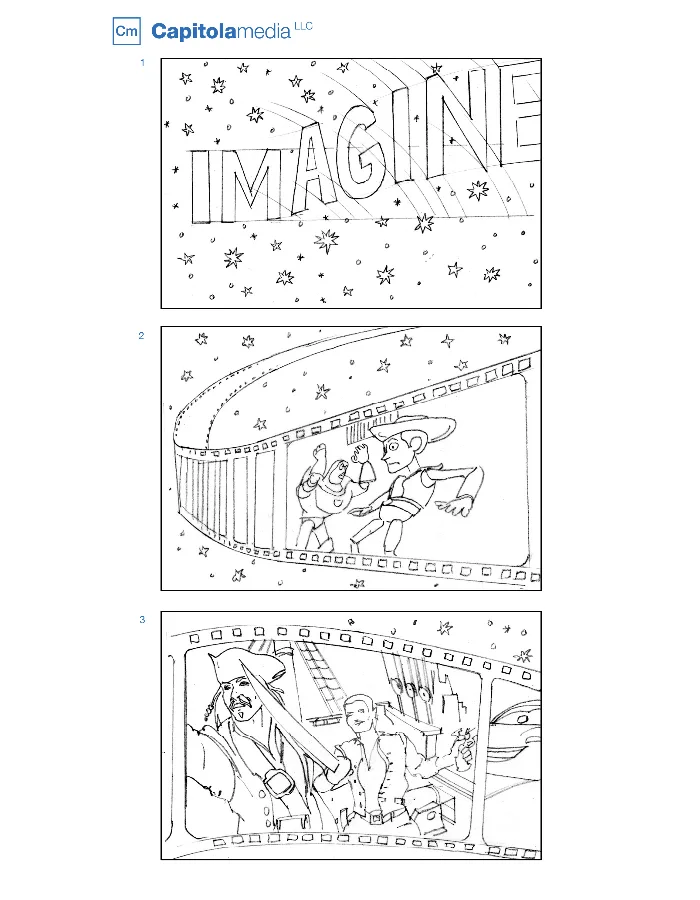
A storyboard translates a video idea into a sequence of planned images. It gives the director, client, crew, and editor a shared reference for what the audience will see. For a commercial, explainer, or scripted corporate film, that reference can expose gaps long before the production spends time building sets or recording footage.
Storyboards do not need to be elaborate artwork to be useful. Rough drawings, photographs, diagrams, and written notes can communicate the essential decisions. The level of detail should match the complexity of the project and the questions the team needs to resolve.
Start with an agreed message and script
Before drawing individual shots, establish the audience, central message, and intended action. Work from a clearly identified script version. If the team has not agreed on what the film says, detailed boards can create the appearance of progress while fundamental decisions remain open.
For corporate video production, the storyboard should connect business communication with a credible visual approach. Identify which ideas can be shown directly, which need an interview or narration, and which may benefit from graphics.
Show the information each shot contributes
Give each panel a scene or shot identifier. Indicate the subject, framing, action, and any important camera movement. Place relevant dialogue or voice over beside the image, with notes on sound, graphics, and transitions when they affect the meaning.
Ask what the viewer learns from the shot. A wide view can establish the setting; a close detail can explain a product action. If several panels repeat the same information, the sequence may need a clearer progression. If a key step exists only in the narration, consider whether the viewer needs visual evidence.
Review the boards with the people who will execute them
The director and cinematographer can assess framing, lens choices, lighting, and camera movement. Production design can identify sets, props, and wardrobe. The editor can flag missing coverage or a transition that requires a specific action. A graphics team can explain what must be captured for a composite.
These conversations turn visual ideas into practical requirements. Connect the boards to a script breakdown so the producer can account for the people, equipment, locations, and preparation behind each sequence.
Use the storyboard to make approvals concrete
A client can respond more precisely to a proposed scene than to a vague promise about tone. Review product presentation, branding, claims, performance style, and the intended environment. Identify who has authority to approve those choices and consolidate feedback before producing another version.
Separate approval of the story from approval of a finished visual treatment. A rough drawing may establish composition without defining the final wardrobe, color palette, or lighting. Record what has been approved and what remains open so departments do not make conflicting assumptions.
Plan pacing and delivery formats
A board sequence can be assembled into an animatic, a rough timed version using still panels and temporary sound. This helps test whether the narration fits, whether a demonstration is understandable, and where the story needs more or less time.
Account for horizontal and vertical delivery at this stage. Essential product detail, faces, and text need room within the intended frames. For motion graphics production, establish text hierarchy and reading time before the design is fully animated.
Keep the boards useful on set and in post
Distribute the approved version, preserve consistent shot numbers, and update the team when a scene changes. The shooting order may differ from the story order because locations, lighting, and availability shape the schedule. A storyboard describes the intended sequence; a shooting schedule organizes how to capture it.
Allow the director room to respond to better opportunities while protecting essential coverage. After filming, share relevant changes with the editor. Capitola Media uses visual planning to make creative intent understandable across departments and keep the finished video connected to the approved brief.